Create your program
This is where you decide everything: what you offer, after how many visits, and in what form. Aster shows three screens and asks one question at a time. Allow two minutes.
Choose the program type
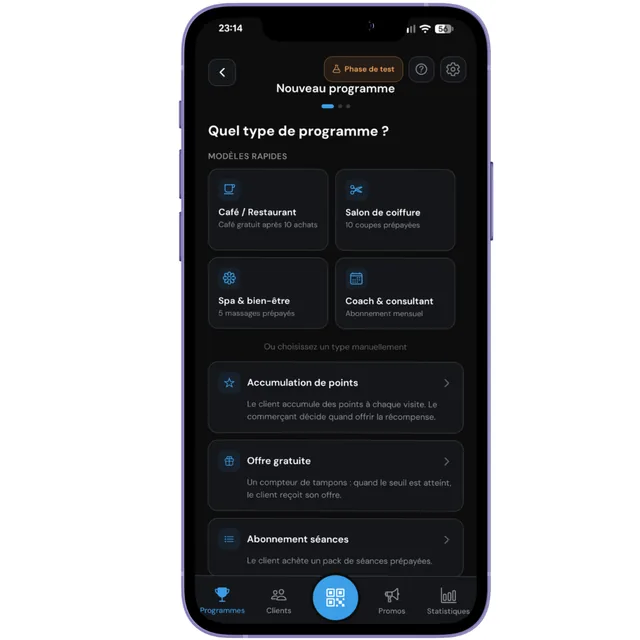
From the Programs tab, start the creation. Aster first offers four quick templates: Coffee shop / Restaurant, Hair salon, Spa & wellness, Coach & consultant. They prefill everything: if one matches your business, you are done thinking.
Otherwise, pick the type by hand from the list below. This is the only truly structural decision in this chapter, because it determines how Aster will count.
The four ways of counting
They are not interchangeable: each matches a different way of charging. Take thirty seconds here and it will save you starting over.
The businesses named below are only common examples. No type is reserved for a trade: what decides is how you charge, not what you sell.
Free offer (the stamp card)
A counter that goes up by one on every visit. At the threshold you set, the customer receives their offer and the counter resets to zero.
Often chosen by: coffee shops, bakeries and restaurants, and more broadly any business where customers return often for a purchase of comparable value.
Example: 10 coffees bought, the 11th is free.
Points
The customer collects points on every visit. Unlike stamps, there is no automatic threshold: you decide when to grant the reward and how many points it costs.
Often chosen by: businesses where the amount spent varies a lot from one visit to the next.
Example: one point per visit, a reward at your discretion.
Session pass
The customer buys a block of sessions up front. On every visit, Aster counts one down. When none are left, the card says so and the visit is refused.
Often chosen by: car washes, spas, studios and coaches, and more broadly anything sold as a package.
Example: a block of 10 washes paid up front.
Time pass
The customer pays for a period, not for a number of visits. Aster calculates the expiry date and checks validity on each visit, counting nothing down.
Often chosen by: gyms and anything sold as unlimited access over a period.
Example: unlimited access for 30 days.
Fill in the details
Aster asks for the bare minimum. For a stamp card: the program name (what your customer will see on their card), the number of stamps before the reward, and the reward text.
- Name: meaningful to the customer, "Coffee card" rather than "Program 1".
- Threshold: your margin calculation. Too high and nobody finishes; too low and you give away too much.
- Reward: write it as you would say it at the counter. "One free coffee".
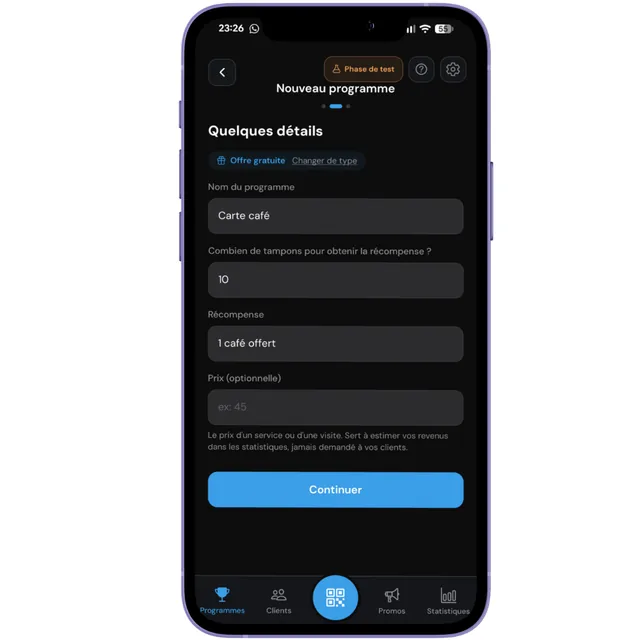
For the points type, this field does not exist: the amount of a purchase varies too much there for a fixed price to mean anything.
Check and create
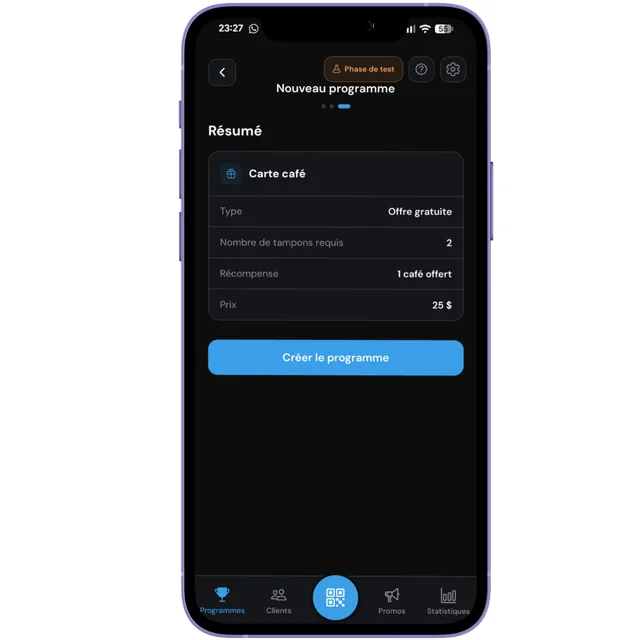
The summary shows your choices on a single screen. This is the last moment to fix a number without consequence: once the program exists and your first customers have signed up, changing the threshold affects cards already in circulation.
Tap Create program. It is active immediately, and its QR code is ready to display at the counter, which is the subject of chapter 5.
What can go wrong
The exact messages the app can show, and what to do about them.
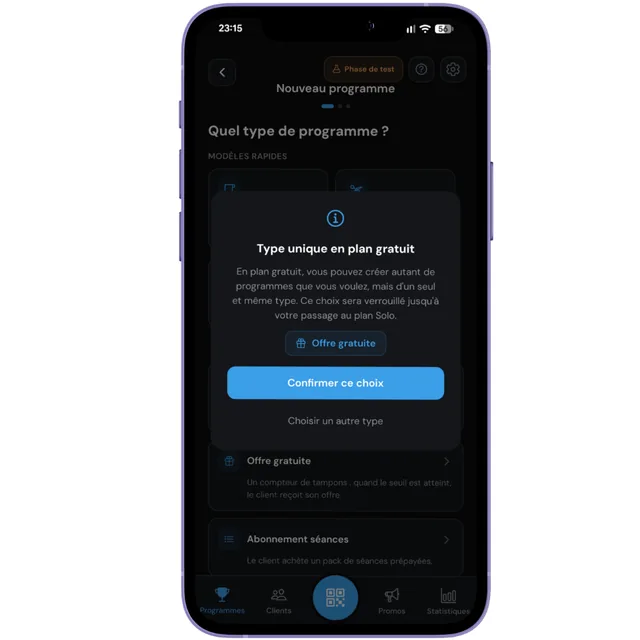
On the free plan, the type is locked by the first program you create. You can create as many as you like and sign up as many customers as you like, but all of the same type. If you started with a stamp card, you cannot add a pass without moving to the Solo plan.
What to take from this: your very first program decides for the ones after it. Think about it for thirty seconds before confirming.
Creating a program requires a verified address. Open the email received at sign-up and follow the link. If nothing arrives, request a new one from your profile, and check your spam folder.