
Promotions
A promotion appears on every customer's card for the period you set. It is the only way in Aster to reach your customers without waiting for them to come back.
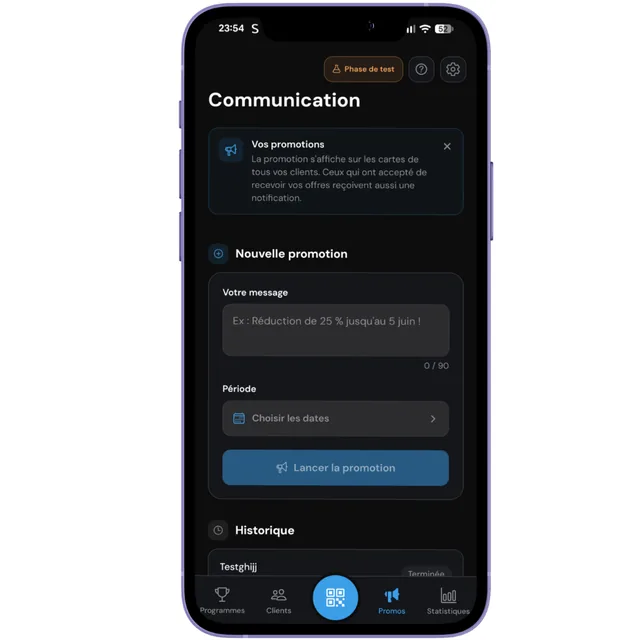
Write your message
The Promos tab gives you a text field limited to 90 characters. That limit is not an arbitrary technical constraint: the message has to stay readable on a wallet card, where space is tight.
- One idea only. "25 percent off until June 5" is understood at a glance.
- An end date in the text. It creates urgency far better than a vague phrase.
- No jargon. The customer reads this between two notifications; they will not decipher anything.
Choose the period
You set a start and an end date. The message appears on the cards at the start of the period and disappears on its own at the end. You have nothing to remove.
You can schedule a promotion in advance: it is created now and published when the day arrives.
Saint-Louis Coffee
The 10th coffee free
7 stamps out of 10
25 percent off until June 5
Who sees the message, and who gets a notification
They are not the same people, and the law is what decides.
Every customer sees the message
It appears on their card, in the browser and in their digital wallet, for the whole period. No exceptions.
Only some receive a notification
Those who ticked the optional box at sign-up. That is what Canadian anti-spam law requires, and Aster will not let you work around it.
How many promotions per month
Free plan
None
Promotions are reserved for the Solo and Pro plans.
Solo plan
4 per month
One a week, which matches the rhythm of an active business.
Pro plan
Unlimited
As many promotions as you want, without counting.
Testing phase
5 per month
For all testers, whatever their plan, for the duration of the test.
During your free trial month, you get Solo-level access: four promotions per month.
What can go wrong
Your two promotions overlap. Aster allows only one at a time, otherwise two messages would compete for the same card. End the current one from the history, or shift your dates.
On the Free plan, no promotions are available. Move to the Solo plan (four a month) or Pro (unlimited) to launch one.
The quota is calculated on the calendar month and resets on the 1st. Wait for next month, or move to the Pro plan for unlimited access.
If its start date is in the future, that is normal: it is scheduled and will be published on the day. If the date has passed, delivery to the wallets can take a few moments.